

10-Week MTD 2026 Preparation Checklist for Self-Employed
Avoid MTD 2026 penalties. Discover threshold changes, quarterly deadlines (7 Aug, 7 Nov), software options & essential prep steps for sole traders.
Rudra Prakash Parida
12/29/202510 min read
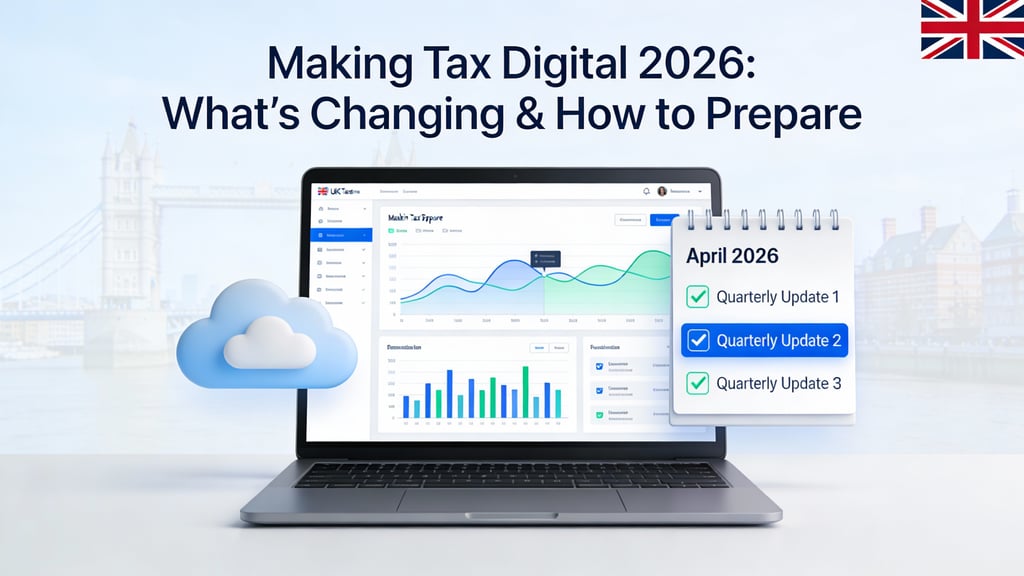

From April 2026, Making Tax Digital for Income Tax becomes mandatory for self-employed individuals and landlords with annual gross income exceeding £50,000 bringing quarterly reporting, digital record-keeping, and new compliance responsibilities. This comprehensive guide walks you through the changes, deadlines, software requirements, and actionable steps to ensure your business is prepared before the April 2026 deadline.
Understanding Making Tax Digital 2026: The Essential Changes
Making Tax Digital for Income Tax (MTD ITSA) represents the most significant overhaul to the UK tax system in a generation, fundamentally changing how sole traders and landlords report their financial information to HM Revenue & Customs. Unlike the annual Self Assessment system used for decades, MTD requires digital record-keeping and quarterly submissions, creating a continuous compliance cycle rather than an end-of-year scramble.
The transition won't happen all at once. Starting from April 2026, businesses with gross annual income over £50,000 must comply. This isn't just about switching to a new form it's a complete shift from paper-based, annual reporting to real-time, digital-first operations. By April 2027, the threshold drops to £30,000, extending MTD to many more small business owners. The government has signalled plans to lower the threshold further to £20,000 in 2028, though legislation hasn't been finalized.
A critical misunderstanding exists around how HMRC calculates eligibility. The £50,000 threshold is based on gross income before expenses not profit. A builder invoicing £60,000 annually but spending £25,000 on materials remains in scope even though taxable profit is closer to £35,000. This catches many business owners by surprise, especially those with multiple income streams from both self-employment and rental property. If you earn £40,000 from self-employment and £20,000 from rental income, your combined qualifying income is £60,000, triggering MTD compliance from April 2026.
Who Must Comply and When: Phased Implementation Timeline
The rollout is deliberately phased to give businesses time to adapt. Understanding which phase affects you is the first critical step in your preparation journey.
April 2026 Phase (£50,000+ Threshold)
From 6 April 2026, this is mandatory for sole traders and landlords with qualifying income exceeding £50,000 in the 2024/25 tax year. HMRC will identify these taxpayers automatically by reviewing filed Self Assessment returns and send notification letters in February 2026. However, don't wait for HMRC's letter it's your responsibility to check whether you're in scope using their online eligibility tool.
April 2027 Phase (£30,000+ Threshold)
The threshold drops to £30,000 from 6 April 2027, bringing many more small business owners into the system. This phase captures businesses with modest turnover but significant time investment consultants, freelancers, and part-time traders who previously escaped quarterly reporting requirements.
April 2028 and Beyond (£20,000+ Threshold)
The government intends to further lower the threshold to £20,000, though exact legislation and timing haven't been confirmed. This will eventually capture the vast majority of self-employed individuals and landlords in the UK.
Temporary Exemptions
Certain taxpayers get a two-year exemption until April 2027, even if they're in scope. This includes those with qualifying income just over the threshold or specific circumstances. Permanently exempt groups include those digitally excluded due to age, disability, or lack of internet access. However, HMRC applies a strict test inconvenience, cost, or unfamiliarity with technology alone won't qualify.
The Quarterly Update System: Deadlines and Submission Requirements
The biggest operational change for most businesses is the shift from annual filing to quarterly updates. Instead of submitting one tax return yearly on 31 January, you'll submit four quarterly updates throughout the tax year, with a final tax return by January 31 the following year.
Understanding the Quarterly Periods
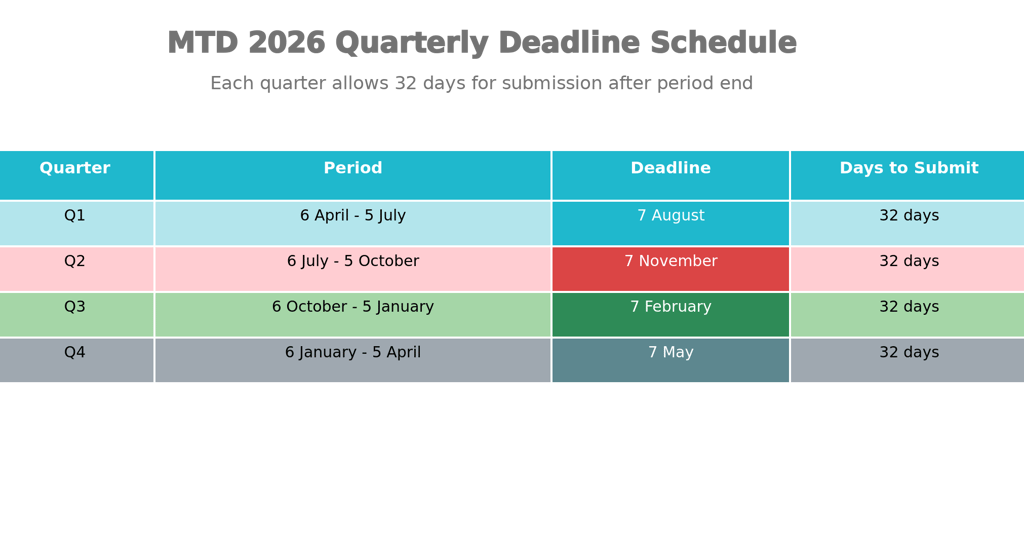
The four quarterly update periods run as follows:
Quarter 1: 6 April – 5 July (due by 7 August)
Quarter 2: 6 July – 5 October (due by 7 November)
Quarter 3: 6 October – 5 January (due by 7 February)
Quarter 4: 6 January – 5 April (due by 7 May)
Each update covers cumulative income and expenses from the start of the tax year, so you're building a complete picture progressively rather than reconstructing it from memory. This cumulative approach means errors in earlier quarters can be corrected in later submissions—HMRC accepts amendments up through the final quarter.
The 31 January 2027 Final Filing
The last time Self Assessment operates under the old system is 31 January 2027, which will be the deadline for 2025/26 tax year returns filed under traditional annual reporting. This is your final opportunity to file using the legacy system if you're not in scope from April 2026.
Managing Missed Deadlines and Penalties
Late submissions trigger a points-based penalty system. You receive one penalty point for each late quarterly update, reaching four points triggers a £200 fine. Subsequent late submissions while at the threshold incur additional £200 fines. Importantly, penalties are cumulative over two years—three late submissions in 2026 followed by one in 2027 continues your penalty count.
The penalty structure creates genuine financial pressure. For a business with modest margins, missing just two quarterly deadlines could cost £200 in penalties. Missing four quarters in a two-year period costs £400+. This reinforces the critical importance of calendar management and software automation.
Digital Record-Keeping Requirements: What You Must Track
MTD isn't merely about quarterly submissions it fundamentally changes how you store and manage business records. HMRC requires digital record-keeping with unbroken digital links between your records and submissions.
What Constitutes Digital Records
You must maintain digital records of all business transactions for self-employment and/or rental property income:
Transaction date
Income or expense category (supplies, materials, travel, rent, repairs)
Amount received or paid
VAT details (if applicable)
Digital copies of invoices and receipts
The emphasis on "digital" is crucial. You can't write down invoice details in a spreadsheet manually—the data must flow digitally from source documents through your accounting software to HMRC. This "digital link" requirement eliminates manual intervention points where errors creep in.
Record Retention Requirements
Unlike VAT records (six years), MTD for Income Tax requires digital records be kept for five years after the 31 January deadline of the relevant tax year. For the 2025/26 tax year, this means storing records until 31 January 2032. Digital storage through cloud-based software, not physical filing cabinets, is the practical approach.
Property Income and Multiple Income Sources
If you rent property, you must track rental income separately from self-employment income. HMRC recognizes that landlords have different recording needs particularly the 2023 Autumn Statement introduced easements for joint-owned properties. Multiple income sources require separate tracking within your accounting software, clearly divided by income type.
The Bridge Between Spreadsheets and MTD
If you've historically used spreadsheets, you have options. Bridging software connects spreadsheet data to HMRC without forcing a complete system overhaul. However, spreadsheets must use formulas for automatic calculations manual updates no longer meet the digital link requirement.
Choosing the Right MTD-Compatible Software
HMRC doesn't provide software the market offers numerous options at different price points and complexity levels. Choosing the wrong platform wastes money and creates compliance risks.
Two Main Software Categories
The market divides into two approaches:
1. Software That Creates Digital Records
These platforms let you build your entire system from scratch. You can link bank accounts for automatic transaction import, scan receipts, or manually enter data. Examples include Xero, QuickBooks, and FreeAgent, all of which connect to HMRC for quarterly submissions and tax returns. These suits most small businesses because they're comprehensive and avoid relying on legacy systems.
2. Bridging Software
If you're attached to spreadsheets or existing accounting tools, bridging software connects your records to HMRC without changing your workflow. You maintain spreadsheets, and the bridge creates digital links for MTD compliance. However, bridging requires spreadsheets with proper formulas manual calculations don't meet HMRC's digital link standard.
Software Comparisons: Xero, QuickBooks, and FreeAgent
Xero consistently emerges as accountants' preferred platform due to superior reporting capabilities and cleaner data structure, making ongoing compliance easier. However, for simple freelance operations, FreeAgent's UK-focused approach and potential free access through partner banks makes it attractive.
HMRC Estimates Total Cost
HMRC forecasts a one-off transitional cost of £280-350 per business (including software, training, and setup), plus annual ongoing software costs of £110-115. For mid-tier platforms like Xero, realistic annual costs run £240-420. These costs are business expenses, fully deductible against profits, reducing actual cash impact.
Finding Your Software
HMRC's software finder tool on gov.uk lets you input your specific needs (income sources, business type, budget) and returns a personalized list of compliant options. This beats generic recommendations because it matches your actual requirements.
Eight-Point Preparation Checklist: Get Ready Now
Waiting until April 2026 to prepare is a recipe for failure. Successful transitions require action starting today.
1. Confirm Your Qualifying Income (Now)
Use HMRC's online tool to establish whether you're in scope and when. Review your 2024/25 tax return for gross income from self-employment and/or rental property. If it exceeds £50,000, you're in the April 2026 phase. If £30,000-£50,000, you're April 2027. Don't wait for HMRC's letter.
2. Choose and Set Up Your Software (By February 2026)
Select software before April 2026 waiting until the deadline creates last-minute chaos. Test it with sample data, connect bank feeds, and ensure it processes transactions correctly. Many platforms offer free trials; use them thoroughly.
3. Separate Business and Personal Finances (Immediately)
If you've mixed business and personal finances on a personal bank account, open a dedicated business account. Services like Starling, Tide, and Mettle offer free or low-cost business accounts ideal for sole traders. This separation dramatically simplifies MTD compliance and clarifies your financial picture.
4. Convert to Digital Record-Keeping (By March 2026)
Stop keeping paper receipts in shoeboxes and handwritten ledgers. Scan existing receipts, store digital copies in cloud storage (Google Drive, Dropbox), and establish a process for capturing new receipts digitally. Many MTD platforms include receipt-scanning apps use them.
5. Create Separate Records for Multiple Income Sources (Ongoing)
If you have both self-employment and rental income, ensure your software tracks them separately. This isn't optional HMRC requires distinct records by income type. Your accounting software must support this division.
6. Set Quarterly Reminders for Deadlines (Now)
Mark calendar entries for all four quarterly deadlines (7 August, 7 November, 7 February, 7 May). Better yet, schedule software reminders or task alerts two weeks before each deadline. This prevents accidental late submissions.
7. Get Professional Support (Consider Now)
If you're uncomfortable with technology or have complex circumstances, engage an accountant early. HMRC permits main agents and supporting agents an accountant can handle submissions while a bookkeeper maintains records. Arranging this now costs far less than crisis management in April.
8. Calculate and Budget for Tax Liability (Quarterly)
Moving to quarterly updates lets you forecast tax liability regularly instead of being shocked in January. From the first quarter onwards, calculate estimated tax based on accumulated profits and set money aside. For income of £30,000-£60,000, budget 25-30% of profits for tax.
Common Mistakes to Avoid: Lessons from Early Adopters
Businesses and accountants managing the VAT version of MTD have revealed pitfalls worth understanding.
Not Starting Preparation Early Enough
The biggest mistake is delaying until February or March 2026. Software setup takes time—connecting bank feeds, testing workflows, and ensuring staff understand the new process. Rushing creates errors and last-minute panic. Start now.
Picking Software Without Testing
Comparing spreadsheets doesn't reveal whether software integrates with your bank, handles your specific business type, or works for your accountant. Trial the software with real (or realistic sample) data before committing.
Underestimating Bookkeeping Importance
MTD's success depends entirely on accurate, timely bookkeeping. Accountants unfamiliar with ongoing bookkeeping only doing year-end work struggle with MTD compliance. If your current system relies on annual scrambles, upgrade to monthly or quarterly bookkeeping now.
Misunderstanding the Income Threshold
Many assume the £50,000 refers to profit (after expenses). It doesn't HMRC counts gross income. A property investor earning £45,000 rent and a self-employed person earning £10,000 trading are both in scope with £55,000 combined qualifying income.
Not Planning for Quarterly Submissions
Businesses used to annual filing sometimes treat MTD as just another name for the same process. Quarterly submissions require different mindsets you must reconcile accounts every three months, not once yearly. This demands ongoing software use and bookkeeping discipline.
Neglecting Digital Exclusion Exemptions
If you genuinely cannot use digital tools due to disability, age, lack of internet access, or religious reasons, apply for exemption before April 2026. HMRC applies strict tests, but legitimate disabilities, significant age limitations, or remote locations with no broadband qualify.
Making Tax Digital 2026: FAQ
Q: What if my income fluctuates around the £50,000 threshold?
A: HMRC looks at your prior year's filed tax return. If 2024/25 shows gross income under £50,000, you're not in scope from April 2026 though you might be April 2027 if 2025/26 exceeds £30,000. The threshold applies in phases, not retroactively within a year.
Q: Can I use spreadsheets with MTD?
A: Not alone. Spreadsheets must use bridging software and include formulas for automatic calculations (not manual updates) to meet digital link requirements. Pure spreadsheets without bridging don't work.
Q: What happens if I miss a quarterly deadline?
A: You incur a penalty point, and four points trigger a £200 fine. Subsequent late submissions at or above the threshold each incur £200 fines. Penalties persist for two years, encouraging compliance.
Q: Do I need an accountant?
A: Not legally you can self-manage using compatible software. However, many find professional support reduces stress, ensures accuracy, and allows them to focus on business. Accountants can be appointed as main agents to fully manage MTD obligations.
Q: Is MTD mandatory if I'm digitally excluded?
A: No. HMRC grants permanent exemptions for those with disabilities, significant age-related digital barriers, lack of broadband access, or religious grounds. Applications must include supporting evidence, and HMRC applies strict tests inconvenience alone doesn't qualify.
Q: When is my first quarterly update due?
A: If complying from April 2026, your first quarterly update (6 April – 5 July) is due by 7 August 2026. Plan ahead to ensure software is fully tested and records are organized by then.
Q: Will MTD replace Self Assessment?
A: No, not entirely. MTD replaces quarterly Self Assessment returns with quarterly updates, but you still submit an annual tax return by 31 January the following year. The structure simplifies and breaks reporting into manageable chunks.
Q: What if I'm in partnership or limited company?
A: MTD for Income Tax applies to sole traders and unincorporated landlords (individuals who own property directly). Limited companies remain on Corporation Tax and don't use MTD for Income Tax. Partnerships have separate rules confirm with HMRC.
Final Call to Action: Start Your Preparation Journey
Making Tax Digital 2026 isn't a distant future issue—it's happening in less than four months for businesses in scope. The difference between those who prepare early and those who scramble is dramatic.
Your next steps:
Check your scope: Use HMRC's online eligibility tool today to confirm whether April 2026, April 2027, or later applies.
Select software: Trial 2-3 platforms using the HMRC software finder, testing with your actual business data.
Organize records: Begin scanning receipts and converting to digital storage this week.
Consult if needed: If complexity exists (multiple incomes, property, staff), book an accountant appointment now not February.
Mark deadlines: Add all four quarterly submission dates to your calendar and set reminders for two weeks prior.
The businesses that execute now will find April 2026 a smooth transition. Those that delay will face penalties, errors, and stress. Your competitive advantage starts with preparation today.
Contact
Reach out for insights and support
Phone
+447768010239
© 2025. All rights reserved.